
 HQ/EMEAFind out how we can help your business

What is the HTTP TRACE Method?
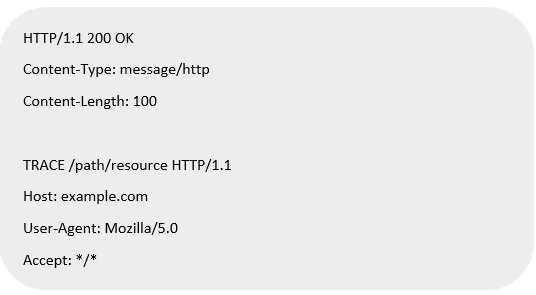
The HTTP TRACE method is part of the HTTP protocol, defined in RFC 7231. It is primarily used for diagnostic purposes and allows a client to see what is being received at the other end of the request chain. When a TRACE request is made, the server echoes back the received request, often including headers and any intermediate proxy modifications.
Key Features of the TRACE Method
- Request Reflection: The server responds with the exact request message, including headers, as received.
- Diagnostic Tool: Helps in debugging by showing how request headers are altered by intermediate proxies.
- No Request Body: TRACE requests typically do not include a body.
- Non-idempotent: TRACE is not idempotent and can expose sensitive information.
How Does the TRACE Method Work?
Workflow:
- Client Sends a TRACE Request:

- Server Responds with the Echoed Request:

- Intermediate Proxies Modify the Request: If proxies are in the path, they may alter headers or append metadata, which will also be reflected in the response.
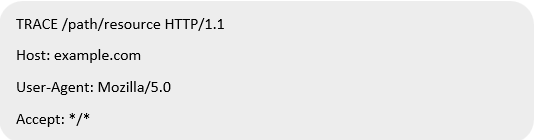
Use Cases of the TRACE Method
Legitimate Use Cases
- Testing and Debugging: TRACE helps developers and network administrators understand how their requests are processed.
- Identifying Proxy Modifications: Ensures proxies are behaving as expected by analyzing header modifications.
Malicious Use Cases
- Cross-Site Tracing (XST): Attackers exploit TRACE to steal sensitive information like cookies or authentication tokens via JavaScript.
- Header Analysis for Information Leakage: Sensitive data such as internal IP addresses may be exposed.
Security Risks Associated with the TRACE Method
- Sensitive Information Exposure: TRACE can reveal sensitive headers like Authorization or cookies.
- Potential Abuse in XST Attacks: Exploiting browser vulnerabilities to access TRACE responses.
- Unnecessary Functionality: Most applications do not require TRACE for normal operations, making it an unnecessary risk.
Fixes and Mitigation Strategies
Disable TRACE on Web Servers
Disabling TRACE is often the best mitigation strategy. Configuration examples for common servers:
Apache
Add the following to the server configuration file:

Nginx
Nginx does not support the TRACE method by default. If enabled, ensure it is disabled using:
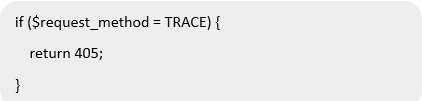
IIS (Microsoft Internet Information Services)
Modify the registry to disable TRACE:
- Navigate to HKEY_LOCAL_MACHINE\SYSTEM\CurrentControlSet\Services\W3SVC\Parameters.
- Add a DWORD entry named DisableHttpTrace and set its value to 1.
Implement Security Headers
- Add X-Content-Type-Options: nosniff and X-Frame-Options: DENY headers.
- Configure Content-Security-Policy (CSP) to prevent XST attacks.
Use Web Application Firewalls (WAFs)
WAFs can block TRACE requests at the application layer.
Conclusion
While the HTTP TRACE method can be a useful diagnostic tool, its security risks often outweigh its benefits in modern web applications. Disabling TRACE and implementing robust security measures are critical to protecting web servers and applications from potential exploits.
Reference
https://developer.mozilla.org/en-US/docs/Web/HTTP/Methods/TRACE
