
 HQ/EMEAFind out how we can help your business

The X-Frame-Options HTTP response header is a security feature that helps protect web applications from clickjacking attacks by controlling whether a browser should allow a page to be displayed in an iframe or frame. Clickjacking is a technique where a malicious website tricks users into clicking on hidden elements of another website, often to perform unintended actions or reveal sensitive information.
How X-Frame-Options Works?
When a browser loads a web page, it checks the X-Frame-Options header in the HTTP response. This header informs the browser whether the page can be embedded in an iframe or not. Based on the value of the header, the browser enforces restrictions:
- Deny: Prevents the page from being displayed in an iframe or frame, regardless of the source.
- SameOrigin: Allows the page to be displayed in an iframe only if the iframe is served from the same origin as the page itself.
- Allow-From URI (Deprecated): Specifies a specific URI that is allowed to embed the page in
an iframe. This value is now deprecated and not widely supported by modern browsers.
Common Values of X-Frame-Options
- DENY
- Completely disallows the page to be embedded in any frame or iframe.
- Example:

- SAMEORIGIN
- Allows the page to be embedded only on pages from the same origin.
- Example:

- ALLOW-FROM (Deprecated)
- Permits embedding from a specific URI. This option is now deprecated due to inconsistent browser support.
- Example:


Why Use X-Frame-Options?
- Protection Against Clickjacking: Prevents malicious actors from embedding your website in a transparent iframe to trick users into performing actions like clicking buttons or entering sensitive information.
- UI Redress Attack: Like clickjacking, this involves manipulating the user interface of a page to mislead users into performing unintended actions. By setting X-Frame-Options to DENY or SAMEORIGIN, the page cannot be embedded in a frame, reducing the risk of such attacks.
- Phishing: Attackers use iframes to mimic sites and steal data. X-Frame-Options blocks this by allowing content only on authorized domains.
How to Implement X-Frame-Options In Web Servers
- Apache: Add the following line to your .htaccess file or the server configuration:

- Nginx: Add the following directive to your configuration file:

- IIS: Configure the HTTP response headers in IIS Manager to include X-Frame-Options.


In Application Code
Add the header in your application’s HTTP response. For example:
- Node.js (Express):

- Middleware Approach:
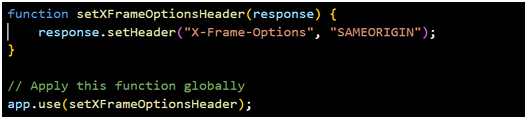
Implement middleware or filters to add the header to every response. Example:


Limitations and Alternatives
- Limited Flexibility: X-Frame-Options does not support granular control over embedding conditions.
- Deprecated Features: The ALLOW-FROM directive is no longer supported by most browsers.
Alternative
Content Security Policy (CSP)
Modern web applications can use the Content-Security-Policy (CSP) header for more flexible and fine-grained control. The CSP directive frame-ancestors specify valid sources for embedding:

Conclusion
The X-Frame-Options header is an effective and straightforward way to enhance web application security by mitigating clickjacking risks. While it may have limitations, it remains a valuable tool for older applications. For more advanced use cases, consider adopting CSP with the frame-ancestors directive.
References
https://developer.mozilla.org/en-US/docs/Web/HTTP/Headers/X-Frame-Options
