
 HQ/EMEAFind out how we can help your business

The Referrer-Policy HTTP header controls how much referrer information the browser includes with requests. It is a key aspect of modern web security and privacy. This document provides a detailed explanation of the referrer policy and its implementation.
What is Referrer Policy?
The Referrer-Policy dictates how much information about the originating page (referrer) is included in the Referrer HTTP header when a user clicks a link, submits a form, or loads a resource like an image, script, or iframe. By default, the Referrer header includes the full URL of the referring page, which can inadvertently expose sensitive information.
Referrer Policy Directives:
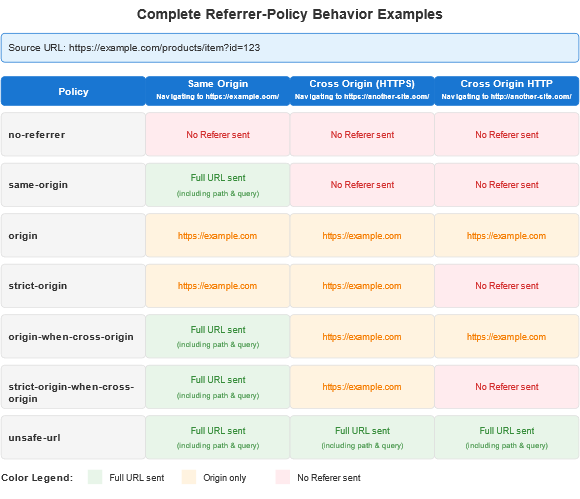
- No-referrer
- Description: No referrer information is sent with any requests.
- Use Case: Maximum privacy for users. Ideal for sensitive applications or secure environments.

- No-referrer-when-downgrade (Default in older browsers)
- Description: Referrer is sent to HTTPS requests but not to HTTP requests.
- Use Case: General-purpose sites where some referrer data is useful but HTTPS to HTTP leaks should be avoided.

- Same-origin
- Description: Referrer is sent only for requests to the same origin. Cross-origin requests will not include the Referrer header.
- Use Case: Internal tools or applications where data leakage to external domains is a concern.

- Origin
- Description: Only the origin (scheme + host + port) is sent, without the path or query parameters.
- Use Case: APIs or systems where sharing the full URL is unnecessary or risky.

- strict-origin
- Description: Like origin but only applies to secure requests. No referrer is sent for HTTP requests.
- Use Case: Privacy-focused sites requiring secure referrer handling.

- origin-when-cross-origin
- Description: Full referrer is sent for same-origin requests. Only the origin is sent for cross-origin requests.
- Use Case: E-commerce sites, blogs, or any application where partial referrer data is useful.

- strict-origin-when-cross-origin (Default in most modern browsers)
- Description: Full referrer is sent for same-origin requests. Only the origin is sent for secure cross-origin requests, and no referrer is sent for insecure cross-origin requests.
- Use Case: Balanced privacy and functionality. Recommended for most websites.

- unsafe-URL
- Description: Full URL (including path and query string) is sent with all requests, even insecure ones.
- Use Case: Rarely recommended due to privacy and security risks.


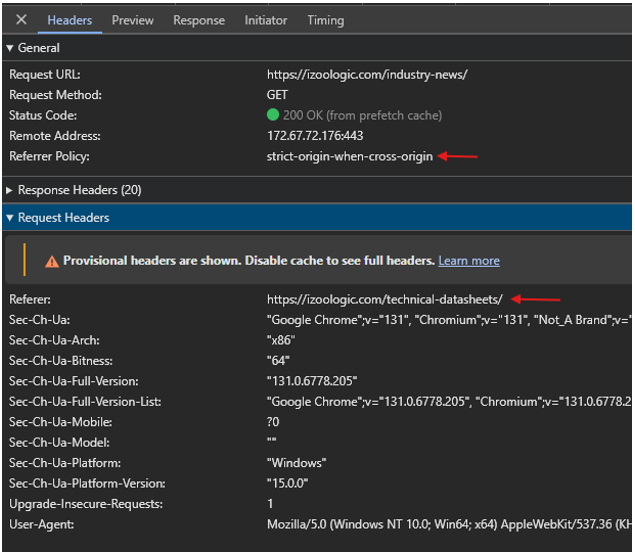
How To See The Referrer Policy?
You can also use the developer tools in any Browser – Chrome, Edge, or Firefox to see the referrer policy used for a specific request.
Implementation of Referrer Policy
A. Setting Referrer Policy via HTTP Headers
Configure your web server to include the Referrer-Policy header in all responses.
Apache Configuration

NGINX Configuration

Express (Node.js)
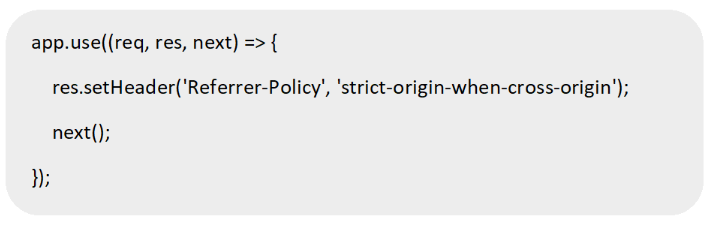
B. Setting Referrer Policy in HTML Meta Tags
Use a meta tag in the <head> section of your HTML documents:

C. Setting Referrer Policy via Content Security Policy (CSP)
Integrate Referrer-Policy into a CSP header:

The Historical Typo
As a curious aside, you might wonder why “Referer” is missing an ‘r’. This spelling was actually a typo in the original HTTP specification. By the time it was noticed, it was too late – the misspelling had become part of the standard.
Conclusion
The Referrer-Policy is a powerful tool for managing the privacy and security of referrer information shared by browsers. Choosing the right policy for your website depends on your specific privacy needs, user experience goals, and application requirements. Adopting a balanced approach, such as the strict-origin-when-cross-origin policy, ensures a secure and functional implementation that aligns with modern web standards.
Reference
https://developer.mozilla.org/en-US/docs/Web/HTTP/Headers/Referrer-Policy
